
Lead management for a contractor means every inquiry goes into one list, each one has a single next step with a date, and nothing leaves the list until it is won, lost or closed out. In practice that is five habits: get every lead in one place, give each one a next step, call fast and log the call, follow up every estimate, and look at what your leads turned into.
None of this needs expensive software. It needs one place to look and the discipline to look at it every day. Below is how to set it up, what to record, and what to check before you pay for any tool.
What lead management means for a contractor
Lead generation is getting homeowners to ask for an estimate. Lead management is everything after that: answering, qualifying, booking the visit, sending the estimate, following up and recording the result.
Most contractors spend their money on the first part and run the second part from memory, a phone’s call log and a stack of notes in the truck. That works at five leads a month. At thirty, leads get forgotten, two people call the same homeowner, and nobody can say which ad paid for itself.
A lead is managed when anyone in your business can open one record and see three things: who the homeowner is, what they want done, and what happens next.
Step 1: get every lead into one list
Inquiries arrive from everywhere: phone calls, missed calls, web forms, texts, social media messages, referrals, bought leads and the neighbor who stopped you in the driveway. Each channel has its own inbox. The first job is to get all of them into one list.
For each lead, record at least:
- Name, phone number and address (or at least the ZIP code)
- The job in their words, plus anything you can see, such as photos or measurements
- Where the lead came from
- The date and time it arrived
- Who on your team owns it
The source and the arrival time matter more than they look. Without them, you cannot work out how fast you respond or which source wins jobs.
Step 2: give every lead one next step and a date
This is the habit that makes the rest work. Every open lead gets one next action and the day it is due. “Call back Tuesday morning.” “Send estimate by Friday.” “Check in after their HOA meets on the 12th.”
A lead with no next step is a lead you have lost without deciding to. If you open your list and see a record with nothing due, either give it a step or close it with a reason.
Use a short set of stages so you can see where each job is up to at a glance:
| Stage | What it means | Typical next step |
|---|---|---|
| New | Arrived, not yet spoken to | Call now |
| Trying to reach | Called, no answer yet | Next call attempt with a time |
| Visit booked | In-home estimate scheduled | Reminder the day before |
| Estimate due | Visit done, estimate not sent | Send by the date you promised |
| Estimate out | Sent, waiting on a decision | Follow-up call on an agreed day |
| Won or lost | Decided | Record the dollar value or the reason |
Step 3: call fast, and log every call
A homeowner who asks for estimates is often asking several contractors at once. The one who calls first gets the first conversation. Plenty of businesses are slow: in a secret-shopper test reported by ProRemodeler in December 2018, only 60% of the 466 home services companies tested had responded after five days, and a company that had not responded in the first six hours had a 75% chance of never responding. That test was run by a marketing company and is several years old, so read it as a picture of how slow many businesses are, not a promise of what speed will win you. Our article on speed to lead for contractors covers response targets you can set.
After each call, log what happened in one line. Reached and booked. No answer, left a voicemail. Wrong number. Not ready until spring. That line is what tells the next person, or you next week, what to do. It also gives you the numbers in Step 5 without extra work.
Step 4: follow up every estimate
An estimate that goes out with no follow-up date is the most expensive leak in most contractors’ businesses, because you have already spent the drive, the visit and the evening writing it.
- Before you leave the visit, agree when they expect to decide and when you will call.
- Put that call on the lead as its next step.
- Follow up on a short schedule, then close the lead politely if you hear nothing.
- If you lose, ask why and record the reason.
For what to say when an estimate goes quiet, see following up a quote that went quiet.
Step 5: see what your leads turned into
Once a month, count the leads by where they came from and follow each group through: how many you reached, how many visits, how many estimates, how many jobs won and what those jobs were worth. Five rows on a page will tell you more than any dashboard you never open.
That count is what lets you compare sources fairly. A cheap lead source that never turns into work costs more than an expensive one that does. Our article on what a lead is worth to your business walks through the arithmetic.
What to look for in any tool
A notebook or spreadsheet can do all of this for a one-truck business. Once you have a team or more than a few leads a day, a tool helps. Before you pay for one, check these points against how you work:
| Check | Why it matters |
|---|---|
| Every source lands in one list without retyping | Leads you have to copy by hand get skipped on busy days |
| It works on a phone, in the truck | Most calls happen between jobs, not at a desk |
| Each lead shows a next step and a due date | That is the core of lead management |
| Logging a call takes one or two taps | If logging is slow, nobody does it |
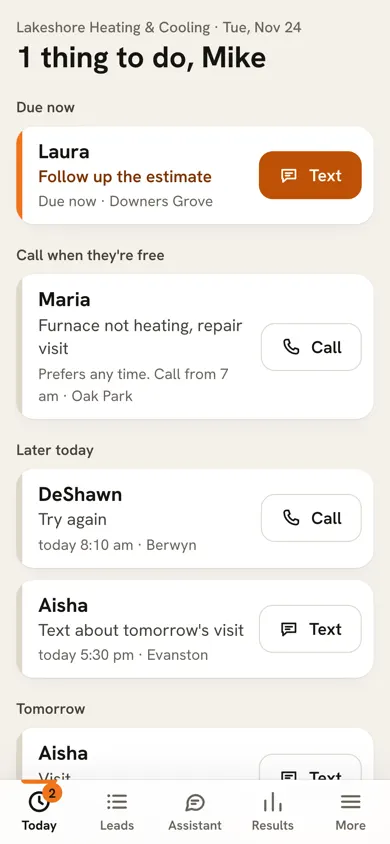
| It shows who to call first today | Saves deciding from scratch every morning |
| It records the source and the result | You need both to judge where your money goes |
| You can get your data out | Your customer list belongs to you if you change tools |
Be wary of tools that need a week of setup before they are useful. If you cannot add a lead and log a call in the first ten minutes, your crew will go back to the notebook.
If PreBuild finds homeowners for you, each one lands in the PreBuild app, which is free with PreBuild and puts these steps on your phone: who to call first, the job details, a one-tap log after each call and follow-up dates on every estimate.
A 15-minute weekly review
Pick a fixed time, such as Monday at 7 a.m., and go through four questions:
- Is there any open lead with no next step? Give it one or close it.
- Is any next step overdue? Do it today or move it with a reason.
- Which estimates went out last week, and is each one’s follow-up booked?
- What did we win and lose last week, and why?
Fifteen minutes a week is enough to keep a small list clean. The list only fails when nobody looks at it.
See how the app works
Common questions
What is lead management for a contractor?
It is how you handle an inquiry from the moment it arrives until the job is won or closed out: one list, a next step and date on each lead, fast calls, a log of every call, follow-up on every estimate and a record of the result.
Do I need software to manage leads?
Not at first. A notebook or a spreadsheet works for a small business if every lead goes in it and you check it daily. A tool earns its place when you have several people answering or more leads than you can track by memory.
How do I stop leads falling through the cracks?
Give every open lead one next step with a due date, and review the list weekly for any lead with nothing due. Most lost leads are ones nobody decided to drop.
What should I record for each lead?
Name, phone, address, the job in their words, where the lead came from, when it arrived, who owns it, each call and its result, and the final outcome with a dollar value or a reason.